
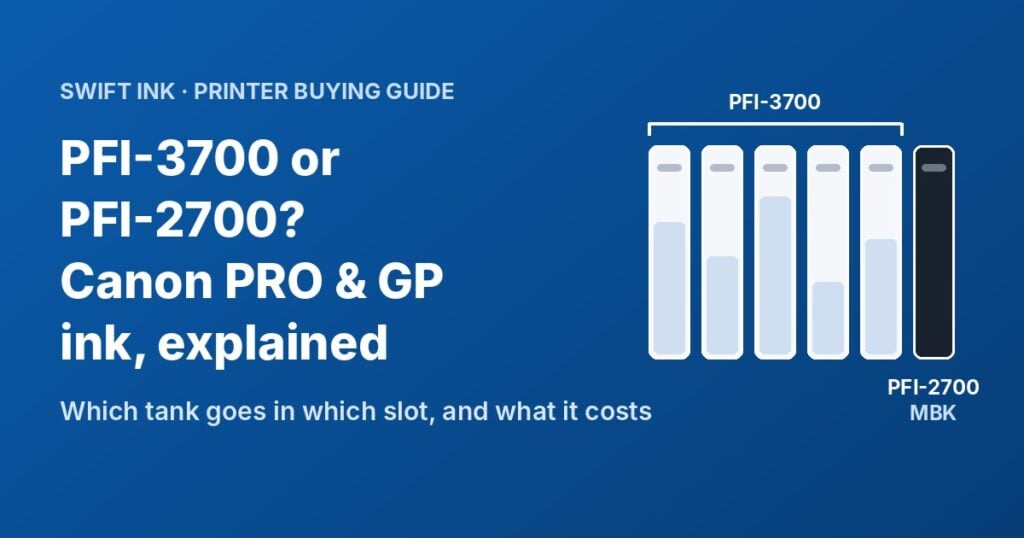
The Canon imagePROGRAF PRO-4600, PRO-2600 and PRO-6600 take PFI-3700 tanks for 11 colors, but their Matte Black is a PFI-2700. The GP-series printers mix the two families in a different way. This guide shows which tank goes in which slot, why the numbers don’t match, and what a full refill really costs.
Quick answer
- PRO-2600, PRO-4600, PRO-6600: 12 tanks. Eleven are PFI-3700. Matte Black is PFI-2700MBK. There is no PFI-3700 Matte Black.
- GP-2600S, GP-4600S, GP-6600S: 7 tanks. Photo Black, Cyan, Magenta, Yellow and Gray are PFI-3700. Matte Black and Orange are PFI-2700.
- GP-2000, GP-4000: all 11 tanks are PFI-2700.
- Sizes: each slot takes the 160 ml, 330 ml or 700 ml version of the same color (PFI-x100, x300, x700).
- Cost: a brand-name 700 ml tank is about $343. Our compatible 700 ml tanks are $119.99, about 65% less (prices checked October 14, 2026).
Canon PRO-4600 ink and GP-series ink: the slot-by-slot chart
Three printer families share these inks. They don’t use them the same way. Find your printer’s column, then read down.
| Color | PRO-2600 / 4600 / 6600 | GP-2600S / 4600S / 6600S | GP-2000 / GP-4000 |
|---|---|---|---|
| Matte Black | PFI-2700MBK | PFI-2700MBK | PFI-2700MBK |
| Photo Black | PFI-3700PBK | PFI-3700PBK | PFI-2700PBK |
| Cyan | PFI-3700C | PFI-3700C | PFI-2700C |
| Magenta | PFI-3700M | PFI-3700M | PFI-2700M |
| Yellow | PFI-3700Y | PFI-3700Y | PFI-2700Y |
| Gray | PFI-3700GY | PFI-3700GY | PFI-2700GY |
| Photo Cyan | PFI-3700PC | Not used | Not used |
| Photo Magenta | PFI-3700PM | Not used | Not used |
| Photo Gray | PFI-3700PGY | Not used | Not used |
| Red | PFI-3700R | Not used | PFI-2700R |
| Blue | PFI-3700B | Not used | Not used |
| Chroma Optimizer | PFI-3700CO | Not used | Not used |
| Orange | Not used | PFI-2700O | PFI-2700O |
| Green, Violet, Fluorescent Pink | Not used | Not used | PFI-2700G, PFI-2700V, PFI-2700FP |
The same chart applies to the 160 ml and 330 ml versions. Swap the “7” in the part number for “1” or “3” (PFI-3100, PFI-3300, PFI-2100, PFI-2300).
Shop compatible ink by printer: PRO-2600, PRO-4600, PRO-6600, GP-4600S, GP-6600S, GP-2000 and GP-4000.
GP-4600S owners: your printer uses 7 colors only. Photo Cyan, Photo Magenta, Photo Gray, Red, Blue and Chroma Optimizer are for the PRO models. They won’t help your GP printer, so skip them when you order.
Why the PRO-4600 Matte Black is a PFI-2700, not a PFI-3700
Canon answers this in a footnote on its PRO-4600 page: the Matte Black ink is the same formulation used in the earlier imagePROGRAF GP-4000 and GP-2000. Those GP printers use the PFI-2700 family, so the Matte Black kept its PFI-2700 part number when Canon put it in the PRO-x600 printers.
The GP-4600S and GP-6600S borrow two inks from the older GP models. Canon says their Matte Black and Orange are the same formulation as the GP-4000/2000. That’s why both are PFI-2700 parts in a printer that otherwise uses PFI-3700.
So if you search for “PFI-3700 Matte Black” and find nothing, that’s why. The part doesn’t exist. Order PFI-2700MBK.
- Eleven PFI-3700 tanks. Photo Black, Cyan, Magenta, Yellow, Gray, Photo Cyan, Photo Magenta, Photo Gray, Red, Blue and Chroma Optimizer.
- One PFI-2700 tank. Matte Black, the same ink Canon uses in the GP-2000 and GP-4000.
Which black does your printer use?
The PRO models keep both blacks loaded, so you never swap tanks. The printer picks the black based on the paper type you choose. Canon’s manual says Photo Black is for photo paper and Matte Black is for coated, matte and fine art papers.
That means your paper decides which black runs out first. If you print mostly on matte or fine art paper, the PFI-2700MBK empties fastest. Keep a spare on the shelf.
Paper tip: Canon warns that on some papers, Matte Black can rub off when the surface gets scuffed. Always set the paper type in the driver to match the paper you load. For more on paper choice, see our guide to photo papers that work with compatible inks.
160 ml, 330 ml or 700 ml: same slot, different size
Canon makes each color in three sizes, and every slot accepts all three:
- 160 ml: PFI-3100 and PFI-2100
- 330 ml: PFI-3300 and PFI-2300
- 700 ml: PFI-3700 and PFI-2700
You can mix sizes. A 700 ml Matte Black next to a 330 ml Photo Cyan is fine. Most shops buy the 700 ml size for the colors they use most, because they change tanks less often.
These printers also have a sub-ink tank. Canon designed it so you can replace an empty tank while a job is printing. A long canvas print won’t stop halfway because one color ran out, as long as you swap the tank when the printer asks.
Our compatible tanks come in the 700 ml size. Each one is labeled with the Canon part number it replaces.
What a full refill costs: brand-name vs Swift Ink
Brand-name 700 ml PFI-3700 tanks sell for $343 each at Staples, and the PFI-2700MBK is $343 at Freestyle Photo. Some sellers charge more: Staples lists the PFI-2700MBK at $399.99. We used $343 as the brand-name price below, which keeps the savings estimate on the low side.
- 65%less per 700 ml tank ($119.99 vs $343)
- 17¢per ml for our tanks, vs 49¢ per ml brand-name
- $2,676saved on a full 12-tank PRO-4600 set
- $72saved on each MC-30 maintenance cartridge ($49.99 vs $122)
Few shops replace every tank at once, so the per-ml number is the one to watch. At 17¢ vs 49¢ per ml, every tank you swap saves about $223. For more on ink pricing across printer types, see our study of what printer ink really costs per page.
MC-30 maintenance cartridge: the part that can stop your printer
The MC-30 collects the waste ink from nozzle checks and cleanings. When it gets close to full, the printer warns you. When it’s full, the printer stops until you replace it. Keep a spare so a full cartridge doesn’t stop a job.
One MC-30 fits more printers than any ink tank in this guide:
- PRO-2600, PRO-4600, PRO-6600
- GP-4600S, GP-6600S, GP-2000, GP-4000
- PRO-2000, PRO-2100, PRO-4000, PRO-4100, PRO-6000, PRO-6100 and their “S” versions
Some imagePROGRAF TX models use it too. Check the part number on your current cartridge or in your manual.
Canon lists its MC-30 at $122.00 (Freestyle Photo, October 14, 2026). Our compatible MC-30 maintenance cartridge is $49.99.
Ink problem or print head problem?
Streaks, missing colors or banding don’t always mean you need ink. Work through these steps in order. The first three cost nothing.
-
Read the message on the control panel Free
The printer usually names the problem: a low or empty tank, a full maintenance cartridge, or a print head error. Start there.
-
Print a nozzle check Free
Run it from the printer’s maintenance menu (see your manual for the exact path). Gaps in one color’s pattern point to clogged nozzles, not an empty tank.
-
Run a cleaning, then check again Free
One cleaning often clears a gap. Each cleaning uses ink and sends waste to the MC-30, so don’t run cleaning after cleaning without checking in between.
-
Replace an empty or unrecognized tank $
If the printer doesn’t read a tank, take it out and seat it again firmly. If it still isn’t recognized, swap in a new one and contact us about the first.
-
Replace the MC-30 when the printer asks $
A full maintenance cartridge stops the printer. It’s a quick swap with no tools.
-
Replace the print head $$$
If the same nozzles stay blank after several cleanings, the print head may be failing. These printers use the PF-10 print head. Canon’s manuals list it for the PRO-4100 and PRO-6100, and dealers list it for the PRO-x600 and GP-x600S models too. Check the model number in your manual before you order.
We sell the genuine Canon PF-10 print head (0861C003) for $799.99. It’s an original Canon part, not a compatible one.
Using compatible tanks: what to expect
Our tanks are compatible tanks made to replace the Canon part numbers above. They are not made by Canon. They install the same way: open the ink cover, take out the empty tank, and push the new one into the slot with the matching color label.
- Match the label, not the position. Slots differ by model, so read the color name on each slot.
- Store spares at room temperature and keep them sealed until you need them.
- Calibrate after big changes. These printers have built-in color calibration. Run it after you replace several tanks if color matching matters for your work.
Any cartridge can be defective, brand-name or compatible. If a tank gives you trouble, contact our support team. You can also read our returns and exchanges policy.
Frequently asked questions
Is there a PFI-3700 Matte Black?
No. Canon makes Matte Black for these printers only as PFI-2700MBK (and the smaller PFI-2300MBK and PFI-2100MBK). It’s the same Matte Black ink used in the GP-2000 and GP-4000.
Can I use PFI-1700 ink in a PRO-4600?
No. The PRO-2600, PRO-4600 and PRO-6600 take only the PFI-2100, 2300, 2700, 3100, 3300 and 3700 families. PFI-1700 tanks are for older models such as the PRO-4000 and PRO-4100.
Does the GP-4600S use Photo Cyan or Chroma Optimizer?
No. The GP-4600S and GP-6600S use 7 colors: Matte Black, Photo Black, Cyan, Magenta, Yellow, Gray and Orange. Photo Cyan, Photo Magenta, Photo Gray, Red, Blue and Chroma Optimizer are for the PRO-x600 models.
Can I mix 330 ml and 700 ml tanks?
Yes. Each slot accepts the 160 ml, 330 ml or 700 ml tank of its color, and you can mix sizes across slots.
My PRO-4600 is discontinued. Can I still get ink?
Yes. As of October 2026, Canon’s US store lists the PRO-4600 and GP-4600S as discontinued. That means Canon stopped selling the printers. Supplies are still sold: brand-name tanks through Canon dealers, and our compatible tanks and MC-30 here.
Need ink or an MC-30 for your imagePROGRAF?
Choose your printer to see every compatible tank, the MC-30 and the PF-10 print head.
Questions about your model? Call (866) 461-3801 or email sales@swiftink.com.